The QTableView 类提供表格视图的默认模型/视图实现。 更多...
| 头: | #include <QTableView> |
| 继承: | QAbstractItemView |
| 继承者: | QTableWidget |
|
|
| QTableView (QWidget * parent = 0) | |
| ~QTableView () | |
| void | clearSpans () |
| int | columnAt (int x ) const |
| int | columnSpan (int row , int column ) const |
| int | columnViewportPosition (int column ) const |
| int | columnWidth (int column ) const |
| Qt::PenStyle | gridStyle () const |
| QHeaderView * | horizontalHeader () const |
| bool | isColumnHidden (int column ) const |
| bool | isCornerButtonEnabled () const |
| bool | isRowHidden (int row ) const |
| bool | isSortingEnabled () const |
| int | rowAt (int y ) const |
| int | rowHeight (int row ) const |
| int | rowSpan (int row , int column ) const |
| int | rowViewportPosition (int row ) const |
| void | setColumnHidden (int column , bool hide ) |
| void | setColumnWidth (int column , int width ) |
| void | setCornerButtonEnabled (bool enable ) |
| void | setGridStyle (Qt::PenStyle style ) |
| void | setHorizontalHeader (QHeaderView * header ) |
| void | setRowHeight (int row , int height ) |
| void | setRowHidden (int row , bool hide ) |
| void | setSortingEnabled (bool enable ) |
| void | setSpan (int row , int column , int rowSpanCount , int columnSpanCount ) |
| void | setVerticalHeader (QHeaderView * header ) |
| void | setWordWrap (bool on ) |
| bool | showGrid () const |
| void | sortByColumn (int column , Qt::SortOrder order ) |
| QHeaderView * | verticalHeader () const |
| bool | wordWrap () const |
| virtual QModelIndex | indexAt (const QPoint & pos ) const |
| virtual void | setModel (QAbstractItemModel * model ) |
| virtual void | setRootIndex (const QModelIndex & index ) |
| virtual void | setSelectionModel (QItemSelectionModel * selectionModel ) |
| void | hideColumn (int column ) |
| void | hideRow (int row ) |
| void | resizeColumnToContents (int column ) |
| void | resizeColumnsToContents () |
| void | resizeRowToContents (int row ) |
| void | resizeRowsToContents () |
| void | selectColumn (int column ) |
| void | selectRow (int row ) |
| void | setShowGrid (bool show ) |
| void | showColumn (int column ) |
| void | showRow (int row ) |
| virtual void | currentChanged (const QModelIndex & current , const QModelIndex & previous ) |
| virtual int | horizontalOffset () const |
| virtual bool | isIndexHidden (const QModelIndex & index ) const |
| virtual QModelIndex | moveCursor (CursorAction cursorAction , Qt::KeyboardModifiers modifiers ) |
| virtual void | paintEvent (QPaintEvent * event ) |
| virtual QModelIndexList | selectedIndexes () const |
| virtual void | selectionChanged (const QItemSelection & selected , const QItemSelection & deselected ) |
| virtual void | setSelection (const QRect & rect , QItemSelectionModel::SelectionFlags flags ) |
| virtual int | sizeHintForColumn (int column ) const |
| virtual int | sizeHintForRow (int row ) const |
| virtual void | timerEvent (QTimerEvent * event ) |
| virtual void | updateGeometries () |
| virtual int | verticalOffset () const |
| virtual QStyleOptionViewItem | viewOptions () const |
| void | columnCountChanged (int oldCount , int newCount ) |
| void | columnMoved (int column , int oldIndex , int newIndex ) |
| void | columnResized (int column , int oldWidth , int newWidth ) |
| void | rowCountChanged (int oldCount , int newCount ) |
| void | rowMoved (int row , int oldIndex , int newIndex ) |
| void | rowResized (int row , int oldHeight , int newHeight ) |
The QTableView 类提供表格视图的默认模型/视图实现。
A QTableView implements a table view that displays items from a model. This class is used to provide standard tables that were previously provided by the QTable 类,但使用由 Qt 模型/视图体系结构提供的方式更灵活。
The QTableView 类是一种 模型/视图类 且属于 Qt 的 模型/视图框架 .
QTableView 实现接口的定义通过 QAbstractItemView 类以允许它显示提供数据,通过模型派生自 QAbstractItemModel 类。
可以通过采用鼠标点击单元格 (或通过使用方向键) 以导航表格单元格。因为 QTableView 启用 tabKeyNavigation 默认情况下,也可以命中 Tab 和 Backtab 键以从一单元格移至另一单元格。
表格拥有的垂直 Header (头部) 的获得可以使用 verticalHeader () 函数,和水平 Header (头) 的获得是透过 horizontalHeader () 函数。可以找到表格中每行的高度通过使用 rowHeight ();同样,可以找到列的宽度使用 columnWidth ()。由于这两者是纯 Widget,可以隐藏它们使用 hide () 函数。
行和列可以被隐藏和展示采用 hideRow (), hideColumn (), showRow (),和 showColumn ()。可以选择它们采用 selectRow () 和 selectColumn ()。表格将展示栅格从属 showGrid 特性。
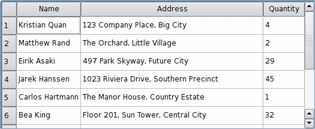
像其它项视图中的项,表格视图中展示的项的渲染和编辑是使用标准 delegates 。不管怎样,对于某些任务,取而代之,有时能将 Widget 插入表格很有用。设置特定索引的 Widget 是采用 setIndexWidget() 函数,和稍后检索采用 indexWidget() .
|
默认情况下,不会展开表格中的单元格以填充可用空间。 可以使单元格填充可用空间,通过拉伸最后 Header (头部) 区间。访问相关 Header (头部) 使用 horizontalHeader () 或 verticalHeader () 并设置 Header (头部) 的 stretchLastSection 特性。 要根据每列 (或每行) 的空间要求分发可用空间,调用视图的 resizeColumnsToContents () 或 resizeRowsToContents () 函数。 |
对于某些专用形式的表格而言,能够在行、列索引和 Widget 坐标之间转换很有用。 rowAt () 函数提供指定行视图中的 Y 坐标;使用行索引可以获得相应 Y 坐标采用 rowViewportPosition ()。 columnAt () 和 columnViewportPosition () 函数提供 X 坐标和列索引之间的等价转换操作。
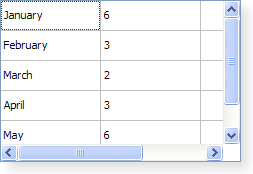
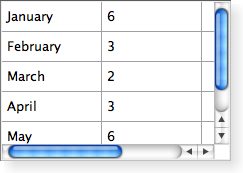
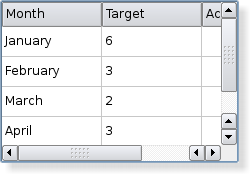
QTableView is styled appropriately for each platform. The following images show how it looks on three different platforms. Go to the Qt Widget 图库 to see its appearance in other styles.
|
|
|
| A Windows XP style table view. | A Macintosh style table view. | A Plastique style table view. |
另请参阅 QTableWidget , 视图类 , QAbstractItemModel , QAbstractItemView , 图表范例 , 像素器范例 ,和 表格模型范例 .
This property holds whether the button in the top-left corner is enabled.
If this property is true then button in the top-left corner of the table view is enabled. Clicking on this button will select all the cells in the table view.
This property is true by default.
该特性在 Qt 4.3 引入。
访问函数:
| bool | isCornerButtonEnabled () const |
| void | setCornerButtonEnabled (bool enable ) |
此特性保持用于绘制栅格的钢笔样式。
此特性保持绘制栅格时的使用样式 (见 showGrid ).
访问函数:
| Qt::PenStyle | gridStyle () const |
| void | setGridStyle (Qt::PenStyle style ) |
This property holds whether the grid is shown.
If this property is true a grid is drawn for the table; if the property is false, no grid is drawn. The default value is true.
访问函数:
| bool | showGrid () const |
| void | setShowGrid (bool show ) |
This property holds whether sorting is enabled.
If this property is true, sorting is enabled for the table. If this property is false, sorting is not enabled. The default value is false.
注意: . Setting the property to true with setSortingEnabled() immediately triggers a call to sortByColumn () 按当前排序区间和次序。
该特性在 Qt 4.2 引入。
访问函数:
| bool | isSortingEnabled () const |
| void | setSortingEnabled (bool enable ) |
另请参阅 sortByColumn ().
This property holds the item text word-wrapping policy.
If this property is true then the item text is wrapped where necessary at word-breaks; otherwise it is not wrapped at all. This property is true by default.
注意,即使启用了换行,也不会展开单元格以拟合所有文本。将插入省略号根据当前 textElideMode .
该特性在 Qt 4.3 引入。
访问函数:
| bool | wordWrap () const |
| void | setWordWrap (bool on ) |
构造表格视图采用 parent 以表示数据。
另请参阅 QAbstractItemModel .
销毁表格视图。
移除表格视图中的所有行、列跨度。
该函数在 Qt 4.4 引入。
另请参阅 setSpan ().
返回列在给定 X 坐标 x ,按内容坐标定位。
注意: 此函数返回 -1 若给定坐标无效 (没有列)。
另请参阅 rowAt ().
[protected slot]
void
QTableView::
columnCountChanged
(
int
oldCount
,
int
newCount
)
此槽被调用,每当添加 (或删除) 列时。之前列数的指定是通过 oldCount ,和新列数的指定是通过 newCount .
[protected slot]
void
QTableView::
columnMoved
(
int
column
,
int
oldIndex
,
int
newIndex
)
此槽被调用以改变索引为给定 column 在表格视图。旧索引指定通过 oldIndex ,和新索引通过 newIndex .
另请参阅 rowMoved ().
[protected slot]
void
QTableView::
columnResized
(
int
column
,
int
oldWidth
,
int
newWidth
)
此槽被调用以改变宽度为给定 column 。旧宽度的指定通过 oldWidth ,和新宽度通过 newWidth .
另请参阅 rowResized ().
返回表格元素的列跨度在 ( row , column )。默认为 1。
该函数在 Qt 4.2 引入。
返回内容坐标中的 X 坐标为给定 column .
返回宽度为给定 column .
另请参阅 setColumnWidth (), resizeColumnToContents (),和 rowHeight ().
[virtual protected]
void
QTableView::
currentChanged
(const
QModelIndex
&
current
, const
QModelIndex
&
previous
)
重实现自 QAbstractItemView::currentChanged ().
[slot]
void
QTableView::
hideColumn
(
int
column
)
隐藏给定 column .
另请参阅 showColumn () 和 hideRow ().
[slot]
void
QTableView::
hideRow
(
int
row
)
隐藏给定 row .
另请参阅 showRow () 和 hideColumn ().
返回表格视图的水平 Header (头部)。
另请参阅 setHorizontalHeader (), verticalHeader (),和 QAbstractItemModel::headerData ().
[virtual protected]
int
QTableView::
horizontalOffset
() const
重实现自 QAbstractItemView::horizontalOffset ().
返回表格视图中项的水平偏移。
注意,表格视图使用水平 Header (头部) 区间位置,来确定视图中列的位置。
另请参阅 verticalOffset ().
[虚拟]
QModelIndex
QTableView::
indexAt
(const
QPoint
&
pos
) const
重实现自 QAbstractItemView::indexAt ().
返回对应表格项的模型项的索引位置,基于位置 pos 按内容坐标。
Returns true if the given column is hidden; otherwise returns false.
另请参阅 isRowHidden ().
[virtual protected]
bool
QTableView::
isIndexHidden
(const
QModelIndex
&
index
) const
重实现自 QAbstractItemView::isIndexHidden ().
Returns true if the given row is hidden; otherwise returns false.
另请参阅 isColumnHidden ().
[virtual protected]
QModelIndex
QTableView::
moveCursor
(
CursorAction
cursorAction
,
Qt::KeyboardModifiers
modifiers
)
重实现自 QAbstractItemView::moveCursor ().
移动光标根据给定 cursorAction ,使用信息提供通过 modifiers .
另请参阅 QAbstractItemView::CursorAction .
[virtual protected]
void
QTableView::
paintEvent
(
QPaintEvent
*
event
)
重实现自 QWidget::paintEvent ().
描绘表格当收到给定描绘事件 event .
[slot]
void
QTableView::
resizeColumnToContents
(
int
column
)
重置大小为给定 column 基于用于渲染列中各项的委托的大小提示。
注意: 仅重置可见列的大小。重实现 sizeHintForColumn () 以重置隐藏列的大小。
[slot]
void
QTableView::
resizeColumnsToContents
()
基于用于渲染列中各项的委托的大小提示,重置所有列的大小。
[slot]
void
QTableView::
resizeRowToContents
(
int
row
)
重置大小为给定 row 基于用于渲染行中各项的委托的大小提示。
[slot]
void
QTableView::
resizeRowsToContents
()
重置所有行大小,基于用于渲染行中各项的委托的大小提示。
返回在给定 Y 坐标处的行, y ,按内容坐标定位。
注意: 此函数返回 -1 若给定坐标无效 (没有行)。
另请参阅 columnAt ().
[protected slot]
void
QTableView::
rowCountChanged
(
int
oldCount
,
int
newCount
)
此槽被调用,每当添加 (或删除) 行时。之前行数的指定是通过 oldCount ,和新行数的指定是通过 newCount .
返回高度为给定 row .
另请参阅 setRowHeight (), resizeRowToContents (),和 columnWidth ().
[protected slot]
void
QTableView::
rowMoved
(
int
row
,
int
oldIndex
,
int
newIndex
)
此槽被调用以改变索引为给定 row 在表格视图。旧索引指定通过 oldIndex ,和新索引通过 newIndex .
另请参阅 columnMoved ().
[protected slot]
void
QTableView::
rowResized
(
int
row
,
int
oldHeight
,
int
newHeight
)
此槽被调用以改变高度为给定 row 。旧高度的指定是通过 oldHeight ,和新高度通过 newHeight .
另请参阅 columnResized ().
返回表格元素的行跨度在 ( row , column )。默认为 1。
该函数在 Qt 4.2 引入。
另请参阅 setSpan () 和 columnSpan ().
以内容坐标形式返回 Y 坐标为给定 row .
[slot]
void
QTableView::
selectColumn
(
int
column
)
选择给定 column 在表格视图若当前 SelectionMode and SelectionBehavior 允许选中列。
另请参阅 selectRow ().
[slot]
void
QTableView::
selectRow
(
int
row
)
选择给定 row 在表格视图若当前 SelectionMode and SelectionBehavior 允许选中行。
另请参阅 selectColumn ().
[virtual protected]
QModelIndexList
QTableView::
selectedIndexes
() const
重实现自 QAbstractItemView::selectedIndexes ().
[virtual protected]
void
QTableView::
selectionChanged
(const
QItemSelection
&
selected
, const
QItemSelection
&
deselected
)
重实现自 QAbstractItemView::selectionChanged ().
若 hide 为 true 给定 column 将被隐藏;否则,会展示它。
另请参阅 isColumnHidden () 和 setRowHidden ().
设置宽度为给定 column 到 width .
该函数在 Qt 4.1 引入。
另请参阅 columnWidth ().
将用于水平 Header (头部) 的 Widget 设为 header .
另请参阅 horizontalHeader () 和 setVerticalHeader ().
[虚拟]
void
QTableView::
setModel
(
QAbstractItemModel
*
model
)
重实现自 QAbstractItemView::setModel ().
[虚拟]
void
QTableView::
setRootIndex
(const
QModelIndex
&
index
)
重实现自 QAbstractItemView::setRootIndex ().
设置高度为给定 row 到 height .
该函数在 Qt 4.1 引入。
另请参阅 rowHeight ().
若 hide 为 true row 将被隐藏,否则它将被展示。
另请参阅 isRowHidden () 和 setColumnHidden ().
[virtual protected]
void
QTableView::
setSelection
(const
QRect
&
rect
,
QItemSelectionModel::SelectionFlags
flags
)
重实现自 QAbstractItemView::setSelection ().
选择项基于给定 rect 和根据指定选定 flags .
[虚拟]
void
QTableView::
setSelectionModel
(
QItemSelectionModel
*
selectionModel
)
重实现自 QAbstractItemView::setSelectionModel ().
设置表格元素的跨度按 ( row , column ) 到行/列数指定通过 ( rowSpanCount , columnSpanCount ).
该函数在 Qt 4.2 引入。
另请参阅 rowSpan () 和 columnSpan ().
将用于垂直 Header (头部) 的 Widget 设为 header .
另请参阅 verticalHeader () 和 setHorizontalHeader ().
[slot]
void
QTableView::
showColumn
(
int
column
)
展示给定 column .
另请参阅 hideColumn () 和 showRow ().
[slot]
void
QTableView::
showRow
(
int
row
)
展示给定 row .
另请参阅 hideRow () 和 showColumn ().
[virtual protected]
int
QTableView::
sizeHintForColumn
(
int
column
) const
重实现自 QAbstractItemView::sizeHintForColumn ().
返回大小提示为给定 column 的宽度或 -1 若没有模型。
若需要把给定列宽度设为固定值,调用 QHeaderView::resizeSection () 在表格水平 Header (头部)。
若在子类中重实现此函数,注意,将使用返回值当 resizeColumnToContents () 或 QHeaderView::resizeSections () 被调用。若水平 Header (头部) 或项委托要求更大列宽度,将使用更大宽度代替。
另请参阅 QWidget::sizeHint and horizontalHeader ().
[virtual protected]
int
QTableView::
sizeHintForRow
(
int
row
) const
重实现自 QAbstractItemView::sizeHintForRow ().
返回大小提示为给定 row 的高度或 -1 若没有模型。
若需要把给定行高度设为固定值,调用 QHeaderView::resizeSection () 在表格垂直 Header (头部)。
若在子类中重实现此函数,注意,将仅使用返回值当 resizeRowToContents () 被调用。在此情况下,若垂直 Header (头部) 或项委托要求更大行高度,将使用宽度代替。
另请参阅 QWidget::sizeHint and verticalHeader ().
按值排序模型根据给定 column 以给定 order .
该函数在 Qt 4.2 引入。
另请参阅 sortingEnabled .
[virtual protected]
void
QTableView::
timerEvent
(
QTimerEvent
*
event
)
重实现自 QObject::timerEvent ().
[virtual protected]
void
QTableView::
updateGeometries
()
重实现自 QAbstractItemView::updateGeometries ().
返回表格视图的垂直 Header (头部)。
另请参阅 setVerticalHeader (), horizontalHeader (),和 QAbstractItemModel::headerData ().
[virtual protected]
int
QTableView::
verticalOffset
() const
重实现自 QAbstractItemView::verticalOffset ().
返回表格视图中项的垂直偏移。
注意,表格视图使用垂直 Header (头部) 区间位置,来确定视图中行的位置。
另请参阅 horizontalOffset ().
[virtual protected]
QStyleOptionViewItem
QTableView::
viewOptions
() const
重实现自 QAbstractItemView::viewOptions ().
