The QIcon 類提供在不同模式和狀態下的可伸縮圖標。 更多...
| 頭: | #include <QIcon> |
| enum | Mode { Normal, Disabled, Active, Selected } |
| enum | State { Off, On } |
| QIcon () | |
| QIcon (const QPixmap & pixmap ) | |
| QIcon (const QIcon & other ) | |
| QIcon (const QString & fileName ) | |
| QIcon (QIconEngine * engine ) | |
| QIcon (QIconEngineV2 * engine ) | |
| ~QIcon () | |
| QSize | actualSize (const QSize & size , Mode mode = Normal, State state = Off) const |
| void | addFile (const QString & fileName , const QSize & size = QSize(), Mode mode = Normal, State state = Off) |
| void | addPixmap (const QPixmap & pixmap , Mode mode = Normal, State state = Off) |
| QList<QSize> | availableSizes (Mode mode = Normal, State state = Off) const |
| qint64 | cacheKey () const |
| bool | isNull () const |
| QString | name () const |
| void | paint (QPainter * painter , const QRect & rect , Qt::Alignment alignment = Qt::AlignCenter, Mode mode = Normal, State state = Off) const |
| void | paint (QPainter * painter , int x , int y , int w , int h , Qt::Alignment alignment = Qt::AlignCenter, Mode mode = Normal, State state = Off) const |
| QPixmap | pixmap (const QSize & size , Mode mode = Normal, State state = Off) const |
| QPixmap | pixmap (int w , int h , Mode mode = Normal, State state = Off) const |
| QPixmap | pixmap (int extent , Mode mode = Normal, State state = Off) const |
| void | swap (QIcon & other ) |
| operator QVariant () const | |
| QIcon & | operator= (const QIcon & other ) |
| QIcon & | operator= (QIcon && other ) |
| QIcon | fromTheme (const QString & name , const QIcon & fallback = QIcon()) |
| bool | hasThemeIcon (const QString & name ) |
| void | setThemeName (const QString & name ) |
| void | setThemeSearchPaths (const QStringList & paths ) |
| QString | themeName () |
| QStringList | themeSearchPaths () |
| QDataStream & | operator<< (QDataStream & stream , const QIcon & icon ) |
| QDataStream & | operator>> (QDataStream & stream , QIcon & icon ) |
The QIcon 類提供在不同模式和狀態下的可伸縮圖標。
A QIcon can generate smaller, larger, active, and disabled pixmaps from the set of pixmaps it is given. Such pixmaps are used by Qt widgets to show an icon representing a particular action.
The simplest use of QIcon is to create one from a QPixmap 文件 (或資源),然後使用它,允許 Qt 算齣所有要求圖標的樣式和大小。例如:
QToolButton *button = new QToolButton;
button->setIcon(QIcon("open.xpm"));
To undo a QIcon , simply set a null icon in its place:
button->setIcon(QIcon());
使用 QImageReader::supportedImageFormats () 和 QImageWriter::supportedImageFormats () 函數能檢索支持文件格式的完整列錶。
當檢索像素圖使用 pixmap( QSize , Mode, State), and no pixmap for this given size, mode and state has been added with addFile () 或 addPixmap (),然後 QIcon will generate one on the fly. This pixmap generation happens in a QIconEngineV2 . The default engine scales pixmaps down if required, but never up, and it uses the current style to calculate a disabled appearance. By using custom icon engines, you can customize every aspect of generated icons. With QIconEnginePluginV2 it is possible to register different icon engines for different file suffixes, making it possible for third parties to provide additional icon engines to those included with Qt.
注意: Since Qt 4.2, an icon engine that supports SVG is included.
If you write your own widgets that have an option to set a small pixmap, consider allowing a QIcon to be set for that pixmap. The Qt class QToolButton is an example of such a widget.
Provide a method to set a QIcon , and when you draw the icon, choose whichever pixmap is appropriate for the current state of your widget. For example:
void MyWidget::drawIcon(QPainter *painter, QPoint pos)
{
    QPixmap pixmap = icon.pixmap(QSize(22, 22),
                                   isEnabled() ? QIcon::Normal
                                               : QIcon::Disabled,
                                   isChecked() ? QIcon::On
                                               : QIcon::Off);
    painter->drawPixmap(pos, pixmap);
}
You might also make use of the
Active
mode, perhaps making your widget
Active
when the mouse is over the widget (see
QWidget::enterEvent
()), while the mouse is pressed pending the release that will activate the function, or when it is the currently selected item. If the widget can be toggled, the "On" mode might be used to draw a different icon.
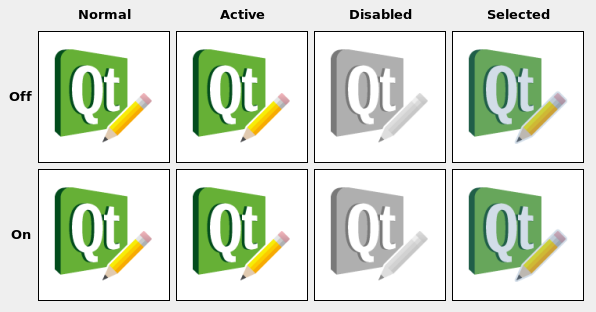
另請參閱 GUI 設計手冊:圖標化標簽 and 圖標範例 .
此枚舉類型描述旨在使用的像素圖模式。目前定義的模式:
| 常量 | 值 | 描述 |
|---|---|---|
QIcon::Normal
|
0
|
顯示像素圖當用戶未與圖標交互時,但由圖標錶示的功能是可用的。 |
QIcon::Disabled
|
1
|
Display the pixmap when the functionality represented by the icon is not available. |
QIcon::Active
|
2
|
Display the pixmap when the functionality represented by the icon is available and the user is interacting with the icon, for example, moving the mouse over it or clicking it. |
QIcon::Selected
|
3
|
顯示像素圖當由圖標錶示的項被選中時。 |
此枚舉描述旨在使用的像素圖狀態。 state 可以是:
| 常量 | 值 | 描述 |
|---|---|---|
QIcon::Off
|
1
|
Display the pixmap when the widget is in an "off" state |
QIcon::On
|
0
|
Display the pixmap when the widget is in an "on" state |
構造 null 圖標。
構造圖標從 pixmap .
構造副本為 other 。這非常快。
構造圖標從文件采用給定 fileName 。將按需加載文件。
若 fileName 包含相對路徑 (如:僅文件名),必須相對運行時工作目錄查找相關文件。
The file name can be either refer to an actual file on disk or to one of the application's embedded resources. See the 資源係統 概述,瞭解如何在應用程序可執行文件中嵌入圖像及其它資源文件的細節。
使用 QImageReader::supportedImageFormats () 和 QImageWriter::supportedImageFormats () 函數能檢索支持文件格式的完整列錶。
創建圖標采用特定圖標 engine 。圖標擁有引擎的所有權。
創建圖標采用特定圖標 engine 。圖標擁有引擎的所有權。
銷毀圖標。
Returns the actual size of the icon for the requested size , mode ,和 state . The result might be smaller than requested, but never larger.
Adds an image from the file with the given fileName 到圖標,作為特殊化為 size , mode and state . The file will be loaded on demand. Note: custom icon engines are free to ignore additionally added pixmaps.
若 fileName 包含相對路徑 (如:僅文件名),必須相對運行時工作目錄查找相關文件。
The file name can be either refer to an actual file on disk or to one of the application's embedded resources. See the 資源係統 概述,瞭解如何在應用程序可執行文件中嵌入圖像及其它資源文件的細節。
使用 QImageReader::supportedImageFormats () 和 QImageWriter::supportedImageFormats () 函數能檢索支持文件格式的完整列錶。
Note: When you add a non-empty filename to a QIcon , the icon becomes non-null, even if the file doesn't exist or points to a corrupt file.
另請參閱 addPixmap ().
添加 pixmap 到圖標,作為特殊化為 mode and state .
自定義圖標引擎可自由忽略額外添加的像素圖。
另請參閱 addFile ().
返迴可用圖標大小的列錶為指定 mode and state .
該函數在 Qt 4.5 引入。
返迴內容標識數對於此 QIcon 對象。截然不同的 QIcon 對象可以擁有相同鍵,若它們引用相同內容。
The cacheKey() will change when the icon is altered via addPixmap () 或 addFile ().
Cache keys are mostly useful in conjunction with caching.
該函數在 Qt 4.3 引入。
另請參閱 QPixmap::cacheKey ().
[static]
QIcon
QIcon::
fromTheme
(const
QString
&
name
, const
QIcon
&
fallback
= QIcon())
返迴 QIcon 對應 name in the current icon theme. If no such icon is found in the current theme fallback 被返迴取而代之。
The latest version of the freedesktop icon specification and naming specification can be obtained here:
To fetch an icon from the current icon theme:
QIcon undoicon = QIcon::fromTheme("edit-undo");
Or if you want to provide a guaranteed fallback for platforms that do not support theme icons, you can use the second argument:
QIcon undoicon = QIcon::fromTheme("edit-undo", QIcon(":/undo.png"));
注意: By default, only X11 will support themed icons. In order to use themed icons on Mac and Windows, you will have to bundle a compliant theme in one of your themeSearchPaths () and set the appropriate themeName ().
該函數在 Qt 4.6 引入。
另請參閱 themeName (), setThemeName (),和 themeSearchPaths ().
[static]
bool
QIcon::
hasThemeIcon
(const
QString
&
name
)
Returns true if there is an icon available for name in the current icon theme, otherwise returns false.
該函數在 Qt 4.6 引入。
另請參閱 themeSearchPaths (), fromTheme (),和 setThemeName ().
Returns true if the icon is empty; otherwise returns false.
圖標為空,若既沒有像素圖也沒有文件名。
注意:即使非 null 圖標也可能無法創建有效像素圖 (如:若文件不存在,或無法讀取)。
返迴用於創建圖標的名稱,若可用。
從屬圖標的創建方式,它可能有關聯名稱。這是用於創建圖標的情況采用 fromTheme () or icons using a QIconEngine which supports the QIconEngineV2::IconNameHook .
該函數在 Qt 4.7 引入。
另請參閱 fromTheme () 和 QIconEngine .
使用 painter 來描繪圖標采用指定 alignment ,要求 mode ,和 state 到矩形 rect .
另請參閱 actualSize () 和 pixmap ().
這是重載函數。
將圖標描繪到矩形 QRect ( x , y , w , h ).
Returns a pixmap with the requested size , mode ,和 state , generating one if necessary. The pixmap might be smaller than requested, but never larger.
另請參閱 setPixmap (), actualSize (),和 paint ().
這是重載函數。
Returns a pixmap of size QSize ( w , h ). The pixmap might be smaller than requested, but never larger.
這是重載函數。
Returns a pixmap of size QSize ( extent , extent ). The pixmap might be smaller than requested, but never larger.
[static]
void
QIcon::
setThemeName
(const
QString
&
name
)
將當前圖標主題設為 name .
The name should correspond to a directory name in the themeSearchPath() containing an index.theme file describing it's contents.
該函數在 Qt 4.6 引入。
另請參閱 themeSearchPaths () 和 themeName ().
[static]
void
QIcon::
setThemeSearchPaths
(const
QStringList
&
paths
)
Sets the search paths for icon themes to paths .
該函數在 Qt 4.6 引入。
另請參閱 themeSearchPaths (), fromTheme (),和 setThemeName ().
交換圖標 other 與此圖標。此操作很快且從不失敗。
該函數在 Qt 4.8 引入。
[static]
QString
QIcon::
themeName
()
返迴當前圖標主題的名稱。
On X11, the current icon theme depends on your desktop settings. On other platforms it is not set by default.
該函數在 Qt 4.6 引入。
另請參閱 setThemeName (), themeSearchPaths (), fromTheme (),和 hasThemeIcon ().
[static]
QStringList
QIcon::
themeSearchPaths
()
返迴圖標主題的搜索路徑。
The default value will depend on the platform:
On X11, the search path will use the XDG_DATA_DIRS environment variable if available.
By default all platforms will have the resource directory
:\icons
as a fallback. You can use "rcc -project" to generate a resource file from your icon theme.
該函數在 Qt 4.6 引入。
另請參閱 setThemeSearchPaths (), fromTheme (),和 setThemeName ().
Returns the icon as a QVariant .
賦值 other 圖標到此圖標並返迴此圖標的引用。
寫入給定 icon 到給定 stream as a PNG image. If the icon contains more than one image, all images will be written to the stream. Note that writing the stream to a file will not produce a valid image file.
該函數在 Qt 4.2 引入。
讀取圖像 (或一組圖像) 從給定 stream 進給定 icon .
該函數在 Qt 4.2 引入。
