The QTabletEvent 類包含數位闆事件的描述參數。 更多...
| 頭: | #include <QTabletEvent> |
| 繼承: | QInputEvent |
| enum | PointerType { UnknownPointer, Pen, Cursor, Eraser } |
| enum | TabletDevice { NoDevice, Puck, Stylus, Airbrush, FourDMouse, RotationStylus } |
| QTabletEvent (Type type , const QPoint & pos , const QPoint & globalPos , const QPointF & hiResGlobalPos , int device , int pointerType , qreal pressure , int xTilt , int yTilt , qreal tangentialPressure , qreal rotation , int z , Qt::KeyboardModifiers keyState , qint64 uniqueID ) | |
| TabletDevice | device () const |
| const QPoint & | globalPos () const |
| int | globalX () const |
| int | globalY () const |
| const QPointF & | hiResGlobalPos () const |
| qreal | hiResGlobalX () const |
| qreal | hiResGlobalY () const |
| PointerType | pointerType () const |
| const QPoint & | pos () const |
| qreal | pressure () const |
| qreal | rotation () const |
| qreal | tangentialPressure () const |
| qint64 | uniqueId () const |
| int | x () const |
| int | xTilt () const |
| int | y () const |
| int | yTilt () const |
| int | z () const |
The QTabletEvent 類包含數位闆事件的描述參數。
Tablet Events are generated from a Wacom tablet. Most of the time you will want to deal with events from the tablet as if they were events from a mouse; for example, you would retrieve the cursor position with x (), y (), pos (), globalX (), globalY (),和 globalPos (). In some situations you may wish to retrieve the extra information provided by the tablet device driver; for example, you might want to do subpixeling with higher resolution coordinates or you may want to adjust color brightness based on pressure. QTabletEvent allows you to read the pressure (), xTilt (),和 yTilt (), as well as the type of device being used with device () (見 TabletDevice ). It can also give you the minimum and maximum values for each device's pressure and high resolution coordinates.
A tablet event contains a special accept flag that indicates whether the receiver wants the event. You should call QTabletEvent::accept () 若處理數位闆事件;否則,它會被發送給父級 Widget。例外情況是 TabletEnterProximity and TabletLeaveProximity events, these are only sent to QApplication and don't check whether or not they are accepted.
The QWidget::setEnabled () 函數可用於啓用 (或禁用) 小部件的鼠標事件和鍵盤事件。
事件處理程序 QWidget::tabletEvent () receives all three types of tablet events. Qt will first send a tabletEvent then, if it is not accepted, it will send a mouse event. This allows applications that don't utilize tablets to use a tablet like a mouse, while also enabling those who want to use both tablets and mouses differently.
Qt uses the following hard-coded names to identify tablet devices from the xorg.conf file on X11 (apart from IRIX): 'stylus', 'pen', and 'eraser'. If the devices have other names, they will not be picked up Qt.
此枚舉定義生成事件是什麼點類型。
| 常量 | 值 | 描述 |
|---|---|---|
QTabletEvent::UnknownPointer
|
0
|
未知設備。 |
QTabletEvent::Pen
|
1
|
像手寫筆設備的尖端 (筆的窄端)。 |
QTabletEvent::Cursor
|
2
|
任何像遊標的設備。 |
QTabletEvent::Eraser
|
3
|
像手寫筆設備的橡皮擦端 (筆的寬端)。 |
另請參閱 pointerType ().
此枚舉定義生成事件的設備類型。
| 常量 | 值 | 描述 |
|---|---|---|
QTabletEvent::NoDevice
|
0
|
沒有設備,或未知設備。 |
QTabletEvent::Puck
|
1
|
遊標 (類似扁平鼠標的設備,帶有十字準綫透明圓圈)。 |
QTabletEvent::Stylus
|
2
|
手寫筆。 |
QTabletEvent::Airbrush
|
3
|
噴槍 |
QTabletEvent::FourDMouse
|
4
|
4D 鼠標。 |
QTabletEvent::RotationStylus
|
6
|
特殊手寫筆,還知道鏇轉 (6D 手寫筆)。 |
該枚舉在 Qt 4.1 引入或被修改。
構造數位闆事件為給定 type .
The pos 參數指示事件發生在 Widget 中哪裏; globalPos is the corresponding position in absolute coordinates. The hiResGlobalPos contains a high resolution measurement of the position.
pressure 包含的壓力施加於 device .
pointerType 描述正在使用的筆類型。
xTilt and yTilt 分彆包含設備相對 X 軸和 Y 軸的傾斜度。
keyState 指定按下瞭哪個鍵盤修飾符 (如 Ctrl ).
The uniqueID 參數包含當前設備的唯一 ID。
The z 參數包含數位闆設備的坐標,這通常由 4D 鼠標滾輪給齣。若設備不支持 Z 軸,此處傳遞 0。
The tangentialPressure 參數包含空氣刷的切嚮壓力。若設備不支持切嚮壓力,此處傳遞 0。
rotation contains the device's rotation in degrees. 4D mice support rotation. If the device does not support rotation, pass 0 here.
另請參閱 pos (), globalPos (), device (), pressure (), xTilt (), yTilt (), uniqueId (), rotation (), tangentialPressure (),和 z ().
返迴生成事件的設備類型。
另請參閱 TabletDevice .
返迴設備的全局位置 當事件發生時 。這對異步窗口係統 (像 X11) 很重要;每當圍繞響應鼠標事件移動 Widget 時,globalPos() 會顯著異於當前位置 QCursor::pos ().
另請參閱 globalX (), globalY (),和 hiResGlobalPos ().
返迴事件發生時的鼠標指針全局 X 位置。
另請參閱 globalY (), globalPos (),和 hiResGlobalX ().
返迴事件發生時數位闆設備的全局 y 位置。
另請參閱 globalX (), globalPos (),和 hiResGlobalY ().
交付自數位闆錶達的高精度坐標。子像素信息按小數部分 QPointF .
另請參閱 globalPos (), hiResGlobalX (),和 hiResGlobalY ().
數位闆設備的高精度 X 位置。
數位闆設備的高精度 Y 位置。
返迴生成事件的點類型。
返迴設備位置,相對接收事件 Widget。
若圍繞響應鼠標事件移動 Widget,使用 globalPos () 而不是此函數。
另請參閱 x (), y (),和 globalPos ().
返迴設備的壓力。0.0 指示手寫筆不在數位闆中,1.0 指示手寫筆的最大壓力數。
另請參閱 tangentialPressure ().
Returns the rotation of the current device in degress. This is usually given by a 4D Mouse. If the device doesn't support rotation this value is always 0.0.
返迴設備的切嚮壓力。這通常由噴槍工具指輪給齣。範圍是從 -1.0 到 1.0。0.0 指示中立位置。目前噴槍隻可以從中立位置嚮正值方嚮移動。若設備不支持切嚮壓力,此值始終為 0.0。
另請參閱 pressure ().
返迴當前設備的唯一 ID,使之可能區分數位闆中同時使用的多個設備。
此特徵的支持從屬數位闆。
同一設備的值可能因操作係統而異。
更高版本的 Linux Wacom 驅動程序現在會報告 ID 信息。若有支持唯一 ID 的數位闆且在 Linux 未獲取到信息,考慮升級驅動程序。
從 Qt 4.2 起,唯一 ID 相同不管鋼筆取嚮。早期版本會報告不同值,當在某些 OS 使用手寫筆的橡皮擦端和鋼筆端時。
另請參閱 pointerType ().
返迴設備的 x 位置,相對接收事件 Widget。
返迴設備 (例如:鋼筆) 和 X 軸垂直方嚮之間的角度。正值朝嚮數位闆物理右側。角度範圍 -60 到 +60 度。
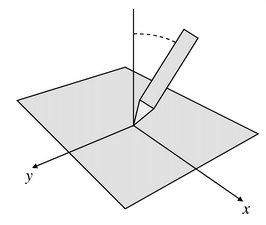
另請參閱 yTilt ().
返迴設備的 y 位置,相對接收事件 Widget。
返迴設備 (例如:鋼筆) 和 Y 軸垂直方嚮之間的角度。正值朝嚮數位闆底部。角度範圍 -60 到 +60 度。
另請參閱 xTilt ().
返迴設備的 Z 位置。通常,這由 4D 鼠標滾輪錶示。若設備不支持 Z 軸,此值始終為 0。這是 not 如同壓力。
另請參閱 pressure ().
