The QUrl class provides a convenient interface for working with URLs. 更多...
| 頭: | #include <QUrl> |
注意: 此類的所有函數 可重入 .
| enum | FormattingOption { None, RemoveScheme, RemovePassword, RemoveUserInfo, ..., StripTrailingSlash } |
| flags | FormattingOptions |
| enum | ParsingMode { TolerantMode, StrictMode } |
| QUrl () | |
| QUrl (const QString & url ) | |
| QUrl (const QUrl & other ) | |
| QUrl (const QString & url , ParsingMode parsingMode ) | |
| ~QUrl () | |
| void | addEncodedQueryItem (const QByteArray & key , const QByteArray & value ) |
| void | addQueryItem (const QString & key , const QString & value ) |
| QList<QByteArray> | allEncodedQueryItemValues (const QByteArray & key ) const |
| QStringList | allQueryItemValues (const QString & key ) const |
| QString | authority () const |
| void | clear () |
| QByteArray | encodedFragment () const |
| QByteArray | encodedHost () const |
| QByteArray | encodedPassword () const |
| QByteArray | encodedPath () const |
| QByteArray | encodedQuery () const |
| QByteArray | encodedQueryItemValue (const QByteArray & key ) const |
| QList<QPair<QByteArray, QByteArray> > | encodedQueryItems () const |
| QByteArray | encodedUserName () const |
| QString | errorString () const |
| QString | fragment () const |
| bool | hasEncodedQueryItem (const QByteArray & key ) const |
| bool | hasFragment () const |
| bool | hasQuery () const |
| bool | hasQueryItem (const QString & key ) const |
| QString | host () const |
| bool | isEmpty () const |
| bool | isLocalFile () const |
| bool | isParentOf (const QUrl & childUrl ) const |
| bool | isRelative () const |
| bool | isValid () const |
| QString | password () const |
| QString | path () const |
| int | port () const |
| int | port (int defaultPort ) const |
| QString | queryItemValue (const QString & key ) const |
| QList<QPair<QString, QString> > | queryItems () const |
| char | queryPairDelimiter () const |
| char | queryValueDelimiter () const |
| void | removeAllEncodedQueryItems (const QByteArray & key ) |
| void | removeAllQueryItems (const QString & key ) |
| void | removeEncodedQueryItem (const QByteArray & key ) |
| void | removeQueryItem (const QString & key ) |
| QUrl | resolved (const QUrl & relative ) const |
| QString | scheme () const |
| void | setAuthority (const QString & authority ) |
| void | setEncodedFragment (const QByteArray & fragment ) |
| void | setEncodedHost (const QByteArray & host ) |
| void | setEncodedPassword (const QByteArray & password ) |
| void | setEncodedPath (const QByteArray & path ) |
| void | setEncodedQuery (const QByteArray & query ) |
| void | setEncodedQueryItems (const QList<QPair<QByteArray, QByteArray> > & query ) |
| void | setEncodedUrl (const QByteArray & encodedUrl ) |
| void | setEncodedUrl (const QByteArray & encodedUrl , ParsingMode parsingMode ) |
| void | setEncodedUserName (const QByteArray & userName ) |
| void | setFragment (const QString & fragment ) |
| void | setHost (const QString & host ) |
| void | setPassword (const QString & password ) |
| void | setPath (const QString & path ) |
| void | setPort (int port ) |
| void | setQueryDelimiters (char valueDelimiter , char pairDelimiter ) |
| void | setQueryItems (const QList<QPair<QString, QString> > & query ) |
| void | setScheme (const QString & scheme ) |
| void | setUrl (const QString & url ) |
| void | setUrl (const QString & url , ParsingMode parsingMode ) |
| void | setUserInfo (const QString & userInfo ) |
| void | setUserName (const QString & userName ) |
| void | swap (QUrl & other ) |
| QByteArray | toEncoded (FormattingOptions options = None) const |
| QString | toLocalFile () const |
| QString | toString (FormattingOptions options = None) const |
| QString | topLevelDomain () const |
| QString | userInfo () const |
| QString | userName () const |
| bool | operator!= (const QUrl & url ) const |
| QUrl & | operator= (const QUrl & url ) |
| QUrl & | operator= (const QString & url ) |
| QUrl & | operator= (QUrl && other ) |
| bool | operator== (const QUrl & url ) const |
| QString | fromAce (const QByteArray & domain ) |
| QUrl | fromEncoded (const QByteArray & input ) |
| QUrl | fromEncoded (const QByteArray & input , ParsingMode parsingMode ) |
| QUrl | fromLocalFile (const QString & localFile ) |
| QString | fromPercentEncoding (const QByteArray & input ) |
| QUrl | fromUserInput (const QString & userInput ) |
| QStringList | idnWhitelist () |
| void | setIdnWhitelist (const QStringList & list ) |
| QByteArray | toAce (const QString & domain ) |
| QByteArray | toPercentEncoding (const QString & input , const QByteArray & exclude = QByteArray(), const QByteArray & 包括 = QByteArray()) |
| uint | qHash (const QUrl & url ) |
| QDataStream & | operator<< (QDataStream & out , const QUrl & url ) |
| QDataStream & | operator>> (QDataStream & in , QUrl & url ) |
| QT_NO_URL_CAST_FROM_STRING |
The QUrl class provides a convenient interface for working with URLs.
It can parse and construct URLs in both encoded and unencoded form. QUrl also has support for internationalized domain names (IDNs).
最常見方式是使用 QUrl is to initialize it via the constructor by passing a QString 。否則, setUrl () 和 setEncodedUrl () 也可以使用。
URLs can be represented in two forms: encoded or unencoded. The unencoded representation is suitable for showing to users, but the encoded representation is typically what you would send to a web server. For example, the unencoded URL "http://bü
hler.example.com/List
of applicants.xml" would be sent to the server as "http://xn--bhler-kva.example.com/List%20of%20applicants.xml", and this can be verified by calling the
toEncoded
() 函數。
URL 也可以逐段構造通過調用 setScheme (), setUserName (), setPassword (), setHost (), setPort (), setPath (), setEncodedQuery () 和 setFragment ()。還有一些方便函數: setAuthority () 設置用戶名、口令、主機和端口。 setUserInfo () sets the user name and password at once.
調用 isValid () to check if the URL is valid. This can be done at any point during the constructing of a URL.
Constructing a query is particularly convenient through the use of setQueryItems (), addQueryItem () 和 removeQueryItem ()。使用 setQueryDelimiters () 以定製用於生成查詢字符串的定界符。
為方便生成編碼 URL 字符串或查詢字符串,有 2 個靜態函數稱為 fromPercentEncoding () 和 toPercentEncoding () which deal with percent encoding and decoding of QStrings.
調用 isRelative () will tell whether or not the URL is relative. A relative URL can be resolved by passing it as argument to resolved (),返迴絕對 URL。 isParentOf () 用於確定一個 URL 是否為另一個的父級。
fromLocalFile () constructs a QUrl by parsing a local file path. toLocalFile () 將 URL 轉換為本地文件路徑。
人類可讀 URL 錶示的抓取是采用 toString ()。此錶示適閤按未編碼形式嚮用戶顯示 URL。不管怎樣,返迴編碼形式通過 toEncoded (), is for internal use, passing to web servers, mail clients and so on.
QUrl conforms to the URI specification from RFC 3986 (URI 統一資源標識符:通用句法),而包括的方案擴展來自 RFC 1738 (Uniform Resource Locators). Case folding rules in QUrl conform to RFC 3491 (Nameprep: A Stringprep Profile for Internationalized Domain Names (IDN)).
遵循這些規則以避免錯誤字符轉換,當處理 URL 和字符串時:
另請參閱 QUrlInfo .
格式化選項定義 URL 是如何被格式的,當以文本寫齣時。
| 常量 | 值 | 描述 |
|---|---|---|
QUrl::None
|
0x0
|
The format of the URL is unchanged. |
QUrl::RemoveScheme
|
0x1
|
The scheme is removed from the URL. |
QUrl::RemovePassword
|
0x2
|
Any password in the URL is removed. |
QUrl::RemoveUserInfo
|
RemovePassword | 0x4
|
Any user information in the URL is removed. |
QUrl::RemovePort
|
0x8
|
Any specified port is removed from the URL. |
QUrl::RemoveAuthority
|
RemoveUserInfo | RemovePort | 0x10
|
|
QUrl::RemovePath
|
0x20
|
The URL's path is removed, leaving only the scheme, host address, and port (if present). |
QUrl::RemoveQuery
|
0x40
|
The query part of the URL (following a '?' character) is removed. |
QUrl::RemoveFragment
|
0x80
|
|
QUrl::StripTrailingSlash
|
0x10000
|
The trailing slash is removed if one is present. |
Note that the case folding rules in Nameprep , which QUrl conforms to, require host names to always be converted to lower case, regardless of the Qt::FormattingOptions used.
The FormattingOptions type is a typedef for QFlags <FormattingOption>. It stores an OR combination of FormattingOption values.
The parsing mode controls the way QUrl 剖析字符串。
| 常量 | 值 | 描述 |
|---|---|---|
QUrl::TolerantMode
|
0
|
QUrl will try to correct some common errors in URLs. This mode is useful when processing URLs entered by users. |
QUrl::StrictMode
|
1
|
Only valid URLs are accepted. This mode is useful for general URL validation. |
In TolerantMode, the parser corrects the following invalid input:
構造空的 QUrl 對象。
構造 URL 通過剖析 url . url is assumed to be in human readable representation, with no percent encoding. QUrl will automatically percent encode all characters that are not allowed in a URL. The default parsing mode is TolerantMode .
範例:
QUrl url("http://www.example.com/List of holidays.xml");
// url.toEncoded() == "http://www.example.com/List%20of%20holidays.xml"
To construct a URL from an encoded string, call fromEncoded ():
QUrl url = QUrl::fromEncoded("http://qt.nokia.com/List%20of%20holidays.xml");
另請參閱 setUrl (), setEncodedUrl (), fromEncoded (),和 TolerantMode .
構造副本為 other .
這是重載函數。
剖析 url 使用剖析模式 parsingMode . The default parsing mode is TolerantMode .
另請參閱 setUrl ().
析構函數;立即調用在對象被刪除之前。
Inserts the pair key = value into the query string of the URL.
Note: this function does not verify that either key or value are properly encoded. It is the caller's responsibility to ensure that the query delimiters are properly encoded, if any.
該函數在 Qt 4.4 引入。
另請參閱 addQueryItem () 和 setQueryDelimiters ().
Inserts the pair key = value into the query string of the URL.
The key/value pair is encoded before it is added to the query. The pair is converted into separate strings internally. The key and value is first encoded into UTF-8 and then delimited by the character returned by valueDelimiter(). Each key/value pair is delimited by the character returned by pairDelimiter().
注意: This method does not encode spaces (ASCII 0x20) as plus (+) signs, like HTML forms do. If you need that kind of encoding, you must encode the value yourself and use QUrl::addEncodedQueryItem .
另請參閱 addEncodedQueryItem ().
Returns the a list of query string values whose key is equal to key from the URL.
Note: if the encoded key does not match the encoded version of the query, this function will not work. That is, if the encoded query of this URL is "search=Qt%20Rules", calling this function with key = "%73earch" will return an empty list.
該函數在 Qt 4.4 引入。
另請參閱 allQueryItemValues (), queryItemValue (),和 encodedQueryItemValue ().
Returns the a list of query string values whose key is equal to key from the URL.
注意: This method does not decode spaces plus (+) signs as spaces (ASCII 0x20), like HTML forms do. If you need that kind of decoding, you must use QUrl::allEncodedQueryItemValues and decode the data yourself.
另請參閱 queryItemValue ().
Returns the authority of the URL if it is defined; otherwise an empty string is returned.
另請參閱 setAuthority ().
重置內容為 QUrl 。在調用此函數後, QUrl 等於采用默認空構造函數構造的。
Returns the fragment of the URL if it is defined; otherwise an empty string is returned. The returned value will have its non-ASCII and other control characters percent-encoded, as in toEncoded ().
該函數在 Qt 4.4 引入。
另請參閱 setEncodedFragment () 和 toEncoded ().
Returns the host part of the URL if it is defined; otherwise an empty string is returned.
Note: encodedHost() does not return percent-encoded hostnames. Instead, the ACE-encoded (bare ASCII in Punycode encoding) form will be returned for any non-ASCII hostname.
此函數相當於調用 QUrl::toAce () on the return value of host ().
該函數在 Qt 4.4 引入。
另請參閱 setEncodedHost ().
Returns the password of the URL if it is defined; otherwise an empty string is returned. The returned value will have its non-ASCII and other control characters percent-encoded, as in toEncoded ().
該函數在 Qt 4.4 引入。
另請參閱 setEncodedPassword () 和 toEncoded ().
Returns the path of the URL if it is defined; otherwise an empty string is returned. The returned value will have its non-ASCII and other control characters percent-encoded, as in toEncoded ().
該函數在 Qt 4.4 引入。
另請參閱 setEncodedPath () 和 toEncoded ().
Returns the query string of the URL in percent encoded form.
另請參閱 setEncodedQuery ().
Returns the first query string value whose key is equal to key from the URL.
Note: if the encoded key does not match the encoded version of the query, this function will not work. That is, if the encoded query of this URL is "search=Qt%20Rules", calling this function with key = "%73earch" will return an empty string.
該函數在 Qt 4.4 引入。
另請參閱 queryItemValue () 和 allQueryItemValues ().
Returns the query string of the URL, as a map of encoded keys and values.
該函數在 Qt 4.4 引入。
另請參閱 setEncodedQueryItems (), setQueryItems (),和 setEncodedQuery ().
Returns the user name of the URL if it is defined; otherwise an empty string is returned. The returned value will have its non-ASCII and other control characters percent-encoded, as in toEncoded ().
該函數在 Qt 4.4 引入。
另請參閱 setEncodedUserName ().
Returns a text string that explains why an URL is invalid in the case being; otherwise returns an empty string.
該函數在 Qt 4.2 引入。
Returns the fragment of the URL.
另請參閱 setFragment ().
[static]
QString
QUrl::
fromAce
(const
QByteArray
&
domain
)
Returns the Unicode form of the given domain name domain , which is encoded in the ASCII Compatible Encoding (ACE). The result of this function is considered equivalent to domain .
If the value in domain cannot be encoded, it will be converted to QString and returned.
The ASCII Compatible Encoding (ACE) is defined by RFC 3490, RFC 3491 and RFC 3492. It is part of the Internationalizing Domain Names in Applications (IDNA) specification, which allows for domain names (like
"example.com"
) to be written using international characters.
該函數在 Qt 4.2 引入。
[static]
QUrl
QUrl::
fromEncoded
(const
QByteArray
&
input
)
剖析 input and returns the corresponding QUrl . input is assumed to be in encoded form, containing only ASCII characters.
The URL is parsed using TolerantMode .
另請參閱 toEncoded () 和 setUrl ().
[static]
QUrl
QUrl::
fromEncoded
(const
QByteArray
&
input
,
ParsingMode
parsingMode
)
這是重載函數。
Parses the URL using parsingMode .
另請參閱 toEncoded () 和 setUrl ().
[static]
QUrl
QUrl::
fromLocalFile
(const
QString
&
localFile
)
返迴 QUrl representation of localFile , interpreted as a local file. This function accepts paths separated by slashes as well as the native separator for this platform.
This function also accepts paths with a doubled leading slash (or backslash) to indicate a remote file, as in "//servername/path/to/file.txt". Note that only certain platforms can actually open this file using QFile::open ().
另請參閱 toLocalFile (), isLocalFile (),和 QDir::toNativeSeparators ().
[static]
QString
QUrl::
fromPercentEncoding
(const
QByteArray
&
input
)
返迴的解碼拷貝源於 input . input 首先從百分比編碼解碼,然後從 UTF-8 轉換成 Unicode。
[static]
QUrl
QUrl::
fromUserInput
(const
QString
&
userInput
)
返迴有效 URL 從用戶供給的 userInput 字符串若可以被扣除。在不可能的情況下,無效 QUrl () 被返迴。
大多數可以瀏覽 Web 的應用程序都允許用戶以純字符串形式輸入 URL。此字符串可以被手動鍵入位置欄,從剪貼闆獲得,或通過命令行自變量傳入。
當字符串不是有效 URL 時,履行最佳猜測做齣各種 Web 相關假定。
若字符串對應係統中的有效文件路徑,構造 file:// URL 使用 QUrl::fromLocalFile ().
若不是這種情況,試圖把字符串轉換成 http:// 或 ftp:// URL。為後者若字符串以 ftp 開頭。然後傳遞結果透過 QUrl 的容忍剖析器,若成功,有效 QUrl 被返迴,否則返迴 QUrl ().
該函數在 Qt 4.6 引入。
Returns true if there is a query string pair whose key is equal to key from the URL.
Note: if the encoded key does not match the encoded version of the query, this function will return false. That is, if the encoded query of this URL is "search=Qt%20Rules", calling this function with key = "%73earch" will return false.
該函數在 Qt 4.4 引入。
另請參閱 hasQueryItem ().
Returns true if this URL contains a fragment (i.e., if # was seen on it).
該函數在 Qt 4.2 引入。
另請參閱 fragment () 和 setFragment ().
Returns true if this URL contains a Query (i.e., if ? was seen on it).
該函數在 Qt 4.2 引入。
另請參閱 hasQueryItem () 和 encodedQuery ().
Returns true if there is a query string pair whose key is equal to key from the URL.
另請參閱 hasEncodedQueryItem ().
返迴 URL 的主機若 URL 有定義;否則返迴空字符串。
另請參閱 setHost ().
[static]
QStringList
QUrl::
idnWhitelist
()
返迴頂級域名的當前白名單,這些域名的組閤中允許有非 ASCII 字符。
見 setIdnWhitelist () 瞭解此列錶的基本原理。
該函數在 Qt 4.2 引入。
另請參閱 setIdnWhitelist ().
Returns true if the URL has no data; otherwise returns false.
Returns true if this URL is pointing to a local file path. A URL is a local file path if the scheme is "file".
Note that this function considers URLs with hostnames to be local file paths, even if the eventual file path cannot be opened with QFile::open ().
該函數在 Qt 4.8 引入。
另請參閱 fromLocalFile () 和 toLocalFile ().
Returns true if this URL is a parent of childUrl . childUrl is a child of this URL if the two URLs share the same scheme and authority, and this URL's path is a parent of the path of childUrl .
Returns true if the URL is relative; otherwise returns false. A URL is relative if its scheme is undefined; this function is therefore equivalent to calling scheme (). isEmpty ().
Returns true if the URL is valid; otherwise returns false.
The URL is run through a conformance test. Every part of the URL must conform to the standard encoding rules of the URI standard for the URL to be reported as valid.
bool checkUrl(const QUrl &url) {
    if (!url.isValid()) {
        qDebug(QString("Invalid URL: %1").arg(url.toString()));
        return false;
    }
    return true;
}
Returns the password of the URL if it is defined; otherwise an empty string is returned.
另請參閱 setPassword ().
返迴 URL 路徑。
另請參閱 setPath ().
Returns the port of the URL, or -1 if the port is unspecified.
另請參閱 setPort ().
這是重載函數。
返迴 URL 端口,或 defaultPort 若端口未指定。
範例:
QFtp ftp;
ftp.connectToHost(url.host(), url.port(21));
該函數在 Qt 4.1 引入。
Returns the first query string value whose key is equal to key from the URL.
注意: This method does not decode spaces plus (+) signs as spaces (ASCII 0x20), like HTML forms do. If you need that kind of decoding, you must use QUrl::encodedQueryItemValue and decode the data yourself.
另請參閱 allQueryItemValues ().
Returns the query string of the URL, as a map of keys and values.
注意: This method does not decode spaces plus (+) signs as spaces (ASCII 0x20), like HTML forms do. If you need that kind of decoding, you must use QUrl::encodedQueryItems and decode the data yourself.
另請參閱 setQueryItems () 和 setEncodedQuery ().
Returns the character used to delimit between key-value pairs in the query string of the URL.
Returns the character used to delimit between keys and values in the query string of the URL.
Removes all the query string pairs whose key is equal to key from the URL.
Note: if the encoded key does not match the encoded version of the query, this function will not work. That is, if the encoded query of this URL is "search=Qt%20Rules", calling this function with key = "%73earch" will do nothing.
該函數在 Qt 4.4 引入。
另請參閱 removeQueryItem ().
Removes all the query string pairs whose key is equal to key from the URL.
另請參閱 removeQueryItem ().
Removes the first query string pair whose key is equal to key from the URL.
Note: if the encoded key does not match the encoded version of the query, this function will not work. That is, if the encoded query of this URL is "search=Qt%20Rules", calling this function with key = "%73earch" will do nothing.
該函數在 Qt 4.4 引入。
另請參閱 removeQueryItem () 和 removeAllQueryItems ().
Removes the first query string pair whose key is equal to key from the URL.
另請參閱 removeAllQueryItems ().
Returns the result of the merge of this URL with relative . This URL is used as a base to convert relative to an absolute URL.
若 relative is not a relative URL, this function will return relative directly. Otherwise, the paths of the two URLs are merged, and the new URL returned has the scheme and authority of the base URL, but with the merged path, as in the following example:
QUrl baseUrl("http://qt.nokia.com/support");
QUrl relativeUrl("../products/solutions");
qDebug(baseUrl.resolved(relativeUrl).toString());
// prints "http://qt.nokia.com/products/solutions"
Calling resolved() with ".." returns a QUrl whose directory is one level higher than the original. Similarly, calling resolved() with "../.." removes two levels from the path. If relative is "/", the path becomes "/".
另請參閱 isRelative ().
Returns the scheme of the URL. If an empty string is returned, this means the scheme is undefined and the URL is then relative.
另請參閱 setScheme () 和 isRelative ().
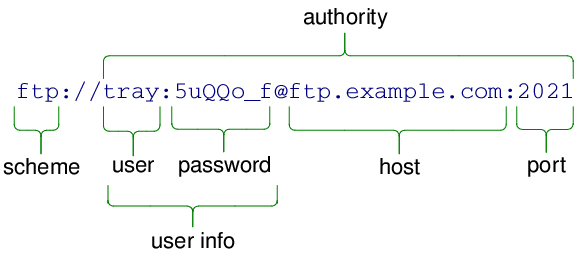
Sets the authority of the URL to authority .
The authority of a URL is the combination of user info, a host name and a port. All of these elements are optional; an empty authority is therefore valid.
The user info and host are separated by a '@', and the host and port are separated by a ':'. If the user info is empty, the '@' must be omitted; although a stray ':' is permitted if the port is empty.
The following example shows a valid authority string:
另請參閱 authority ().
Sets the URL's fragment to the percent-encoded fragment . The fragment is the last part of the URL, represented by a '#' followed by a string of characters. It is typically used in HTTP for referring to a certain link or point on a page:

The fragment is sometimes also referred to as the URL "reference".
Passing an argument of QByteArray() (a null QByteArray ) will unset the fragment. Passing an argument of QByteArray ("") (an empty but not null QByteArray ) will set the fragment to an empty string (as if the original URL had a lone "#").
該函數在 Qt 4.4 引入。
另請參閱 setFragment () 和 encodedFragment ().
Sets the URL's host to the ACE- or percent-encoded host 。 host is part of the user info element in the authority of the URL, as described in setAuthority ().
該函數在 Qt 4.4 引入。
另請參閱 setHost (), encodedHost (), setAuthority (),和 fromAce ().
Sets the URL's password to the percent-encoded password 。 password is part of the user info element in the authority of the URL, as described in setUserInfo ().
Note: this function does not verify that password is properly encoded. It is the caller's responsibility to ensure that the any delimiters (such as colons or slashes) are properly encoded.
該函數在 Qt 4.4 引入。
另請參閱 setPassword (), encodedPassword (),和 setUserInfo ().
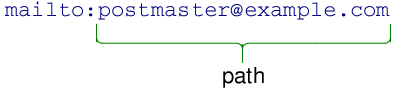
Sets the URL's path to the percent-encoded path . The path is the part of the URL that comes after the authority but before the query string.

For non-hierarchical schemes, the path will be everything following the scheme declaration, as in the following example:
Note: this function does not verify that path is properly encoded. It is the caller's responsibility to ensure that the any delimiters (such as '?' and '#') are properly encoded.
該函數在 Qt 4.4 引入。
另請參閱 setPath (), encodedPath (),和 setUserInfo ().
將 URL 查詢字符串設為 query . The string is inserted as-is, and no further encoding is performed when calling toEncoded ().
This function is useful if you need to pass a query string that does not fit into the key-value pattern, or that uses a different scheme for encoding special characters than what is suggested by QUrl .
Passing a value of QByteArray() to query (a null QByteArray ) unsets the query completely. However, passing a value of QByteArray ("") will set the query to an empty value, as if the original URL had a lone "?".
另請參閱 encodedQuery () 和 hasQuery ().
Sets the query string of the URL to the encoded version of query . The contents of query are converted to a string internally, each pair delimited by the character returned by pairDelimiter(), and the key and value are delimited by valueDelimiter().
Note: this function does not verify that the key-value pairs are properly encoded. It is the caller's responsibility to ensure that the query delimiters are properly encoded, if any.
該函數在 Qt 4.4 引入。
另請參閱 setQueryDelimiters (), encodedQueryItems (),和 setQueryItems ().
Constructs a URL by parsing the contents of encodedUrl .
encodedUrl is assumed to be a URL string in percent encoded form, containing only ASCII characters.
使用 isValid () to determine if a valid URL was constructed.
另請參閱 setUrl ().
Constructs a URL by parsing the contents of encodedUrl 使用給定 parsingMode .
Sets the URL's user name to the percent-encoded userName 。 userName is part of the user info element in the authority of the URL, as described in setUserInfo ().
Note: this function does not verify that userName is properly encoded. It is the caller's responsibility to ensure that the any delimiters (such as colons or slashes) are properly encoded.
該函數在 Qt 4.4 引入。
另請參閱 setUserName (), encodedUserName (),和 setUserInfo ().
Sets the fragment of the URL to fragment . The fragment is the last part of the URL, represented by a '#' followed by a string of characters. It is typically used in HTTP for referring to a certain link or point on a page:
The fragment is sometimes also referred to as the URL "reference".
Passing an argument of QString() (a null QString ) will unset the fragment. Passing an argument of QString ("") (an empty but not null QString ) will set the fragment to an empty string (as if the original URL had a lone "#").
另請參閱 fragment () 和 hasFragment ().
將 URL 的主機設為 host 。主機是授權的一部分。
另請參閱 host () 和 setAuthority ().
[static]
void
QUrl::
setIdnWhitelist
(const
QStringList
&
list
)
Sets the whitelist of Top-Level Domains (TLDs) that are allowed to have non-ASCII characters in domains to the value of list .
Note that if you call this function, you need to do so
\em
before you start any threads that might access
idnWhitelist
().
Qt has comes a default list that contains the Internet top-level domains that have published support for Internationalized Domain Names (IDNs) and rules to guarantee that no deception can happen between similarly-looking characters (such as the Latin lowercase letter
'a'
and the Cyrillic equivalent, which in most fonts are visually identical).
This list is periodically maintained, as registrars publish new rules.
This function is provided for those who need to manipulate the list, in order to add or remove a TLD. It is not recommended to change its value for purposes other than testing, as it may expose users to security risks.
該函數在 Qt 4.2 引入。
另請參閱 idnWhitelist ().
將 URL 口令設為 password 。 password is part of the user info element in the authority of the URL, as described in setUserInfo ().
另請參閱 password () 和 setUserInfo ().
將 URL 路徑設為 path . The path is the part of the URL that comes after the authority but before the query string.
For non-hierarchical schemes, the path will be everything following the scheme declaration, as in the following example:
另請參閱 path ().
將 URL 端口設為 port . The port is part of the authority of the URL, as described in setAuthority ().
port must be between 0 and 65535 inclusive. Setting the port to -1 indicates that the port is unspecified.
另請參閱 port ().
Sets the characters used for delimiting between keys and values, and between key-value pairs in the URL's query string. The default value delimiter is '=' and the default pair delimiter is '&'.

valueDelimiter will be used for separating keys from values, and pairDelimiter will be used to separate key-value pairs. Any occurrences of these delimiting characters in the encoded representation of the keys and values of the query string are percent encoded.
若 valueDelimiter is set to '-' and pairDelimiter is '/', the above query string would instead be represented like this:
http://www.example.com/cgi-bin/drawgraph.cgi?type-pie/color-green
Calling this function does not change the delimiters of the current query string. It only affects queryItems (), setQueryItems () and addQueryItems().
Sets the query string of the URL to an encoded version of query . The contents of query are converted to a string internally, each pair delimited by the character returned by pairDelimiter(), and the key and value are delimited by valueDelimiter().
注意: This method does not encode spaces (ASCII 0x20) as plus (+) signs, like HTML forms do. If you need that kind of encoding, you must encode the value yourself and use QUrl::setEncodedQueryItems .
另請參閱 setQueryDelimiters (), queryItems (),和 setEncodedQueryItems ().
將 URL 方案設為 scheme . As a scheme can only contain ASCII characters, no conversion or encoding is done on the input.
The scheme describes the type (or protocol) of the URL. It's represented by one or more ASCII characters at the start the URL, and is followed by a ':'. The following example shows a URL where the scheme is "ftp":

The scheme can also be empty, in which case the URL is interpreted as relative.
另請參閱 scheme () 和 isRelative ().
Constructs a URL by parsing the contents of url .
url is assumed to be in unicode format, with no percent encoding.
調用 isValid () will tell whether or not a valid URL was constructed.
另請參閱 setEncodedUrl ().
這是重載函數。
剖析 url using the parsing mode parsingMode .
另請參閱 setEncodedUrl ().
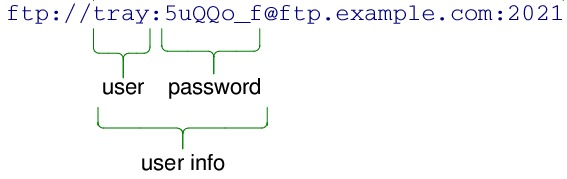
將 URL 用戶信息設為 userInfo . The user info is an optional part of the authority of the URL, as described in setAuthority ().
The user info consists of a user name and optionally a password, separated by a ':'. If the password is empty, the colon must be omitted. The following example shows a valid user info string:
另請參閱 userInfo (), setUserName (), setPassword (),和 setAuthority ().
將 URL 的用戶名設為 userName 。 userName is part of the user info element in the authority of the URL, as described in setUserInfo ().
另請參閱 setEncodedUserName (), userName (),和 setUserInfo ().
交換 URL other 與此 URL。此操作很快且從不失敗。
該函數在 Qt 4.8 引入。
[static]
QByteArray
QUrl::
toAce
(const
QString
&
domain
)
Returns the ASCII Compatible Encoding of the given domain name domain . The result of this function is considered equivalent to domain .
The ASCII-Compatible Encoding (ACE) is defined by RFC 3490, RFC 3491 and RFC 3492. It is part of the Internationalizing Domain Names in Applications (IDNA) specification, which allows for domain names (like
"example.com"
) to be written using international characters.
This function return an empty QByteArra if domain is not a valid hostname. Note, in particular, that IPv6 literals are not valid domain names.
該函數在 Qt 4.2 引入。
Returns the encoded representation of the URL if it's valid; otherwise an empty QByteArray is returned. The output can be customized by passing flags with options .
The user info, path and fragment are all converted to UTF-8, and all non-ASCII characters are then percent encoded. The host name is encoded using Punycode.
Returns the path of this URL formatted as a local file path. The path returned will use forward slashes, even if it was originally created from one with backslashes.
If this URL contains a non-empty hostname, it will be encoded in the returned value in the form found on SMB networks (for example, "//servername/path/to/file.txt").
If this is a relative URL, in Qt 4.x this function returns the path to maintain backward compatability. This will change from 5.0 onwards. Then the path is returned only for URLs where the scheme is "file", and for all other URLs an empty string is returned.
另請參閱 fromLocalFile () 和 isLocalFile ().
[static]
QByteArray
QUrl::
toPercentEncoding
(const
QString
&
input
, const
QByteArray
&
exclude
= QByteArray(), const
QByteArray
&
包括
= QByteArray())
返迴編碼副本為 input . input is first converted to UTF-8, and all ASCII-characters that are not in the unreserved group are percent encoded. To prevent characters from being percent encoded pass them to exclude . To force characters to be percent encoded pass them to 包括 .
Unreserved is defined as: ALPHA / DIGIT / "-" / "." / "_" / "~"
QByteArray ba = QUrl::toPercentEncoding("{a fishy string?}", "{}", "s");
qDebug(ba.constData());
// prints "{a fi%73hy %73tring%3F}"
Returns the human-displayable string representation of the URL. The output can be customized by passing flags with options .
另請參閱 FormattingOptions and toEncoded ().
Returns the TLD (Top-Level Domain) of the URL, (e.g. .co.uk, .net). Note that the return value is prefixed with a '.' unless the URL does not contain a valid TLD, in which case the function returns an empty string.
該函數在 Qt 4.8 引入。
Returns the user info of the URL, or an empty string if the user info is undefined.
另請參閱 setUserInfo ().
Returns the user name of the URL if it is defined; otherwise an empty string is returned.
另請參閱 setUserName () 和 encodedUserName ().
Returns true if this URL and the given url are not equal; otherwise returns false.
賦值指定 url 到此對象。
賦值指定 url 到此對象。
Returns true if this URL and the given url 相等;否則返迴 false。
Computes a hash key from the normalized version of url .
該函數在 Qt 4.7 引入。
寫入 URL url 到流 out 並返迴流引用。
另請參閱 QDataStream 運算符格式 .
將 URL 讀入 url 從流 in 並返迴流引用。
另請參閱 QDataStream 運算符格式 .
禁用自動轉換從 QString (或 char *) 到 QUrl .
Compiling your code with this define is useful when you have a lot of code that uses QString for file names and you wish to convert it to use QUrl for network transparency. In any code that uses QUrl , it can help avoid missing QUrl::resolved () calls, and other misuses of QString to QUrl 轉換。
例如,若有代碼像
url = filename; // probably not what you want
可以把它重寫成
url = QUrl::fromLocalFile(filename);
url = baseurl.resolved(QUrl(filename));
另請參閱 QT_NO_CAST_FROM_ASCII .
